


.png)
Why invest in AI accounts payable software
Manual accounts payable means someone on your team is keying in invoice details, chasing down approvers, and rebuilding a vendor spend report by hand every month. Meanwhile, employee reimbursements often live in a completely separate process, on a separate timeline, with no shared visibility into what your company actually owes at any given moment.
AI accounts payable software closes that gap. Learn how Zeni's AI Accountant codes every bill and reimbursement automatically, and how an AI CFO turns any AP question into a real-time answer.

What is AI accounts payable?
AI accounts payable is the use of artificial intelligence to automate the accounts payable process: capturing invoice and receipt data, coding it to the right vendor, category, and class, routing it through approvals, scheduling payment, and reconciling it against the books, without a person manually entering each field.
AI accounts payable: what finance teams struggle with today
Manual AP means invoice details get typed in by hand, which is slow and error-prone, and approvals stall when an approver doesn't notice a request sitting in their inbox. Employee reimbursements often run through an entirely separate process from vendor bills, with different visibility and different timelines, even though both represent money the company owes.
Vendor visibility suffers too. Knowing which vendors are your biggest spend, which prepaid contracts are still amortizing, or which vendors are missing a W-9 for 1099 filing usually means pulling several different reports instead of checking one screen.
Ditch the separate spreadsheets for bills, reimbursements, and vendor tracking. Software can keep all three in sync automatically.

The best AI accounts payable software features
When evaluating an AI accounts payable solution, look for:
- Automated invoice capture. Bills should auto-populate vendor, amount, invoice number, and due date from an uploaded document, not require manual entry.
- Approval routing with reminders. Invoices and reimbursements should move through your approval chain automatically, with follow-ups sent if something sits too long.
- Reimbursements on the same rails as bills. Employee out-of-pocket expenses should follow the same draft, approval, schedule, and paid lifecycle as vendor bills, not a separate process.
- Vendor-level spend visibility. You should be able to see year-to-date spend by vendor without building a report from scratch.
- Automated schedules. Prepaid expenses and fixed asset depreciation should track and update on their own, not require a recurring manual journal entry.
- 1099 compliance tracking. The software should flag which vendors need a W-9 or are missing one, before filing season becomes a scramble.
- Conversational reporting. You should be able to ask a specific question about your AP and get an answer, not just a static report.
Introducing Zeni's AI Accounts Payable: one system for bills, reimbursements, and vendors
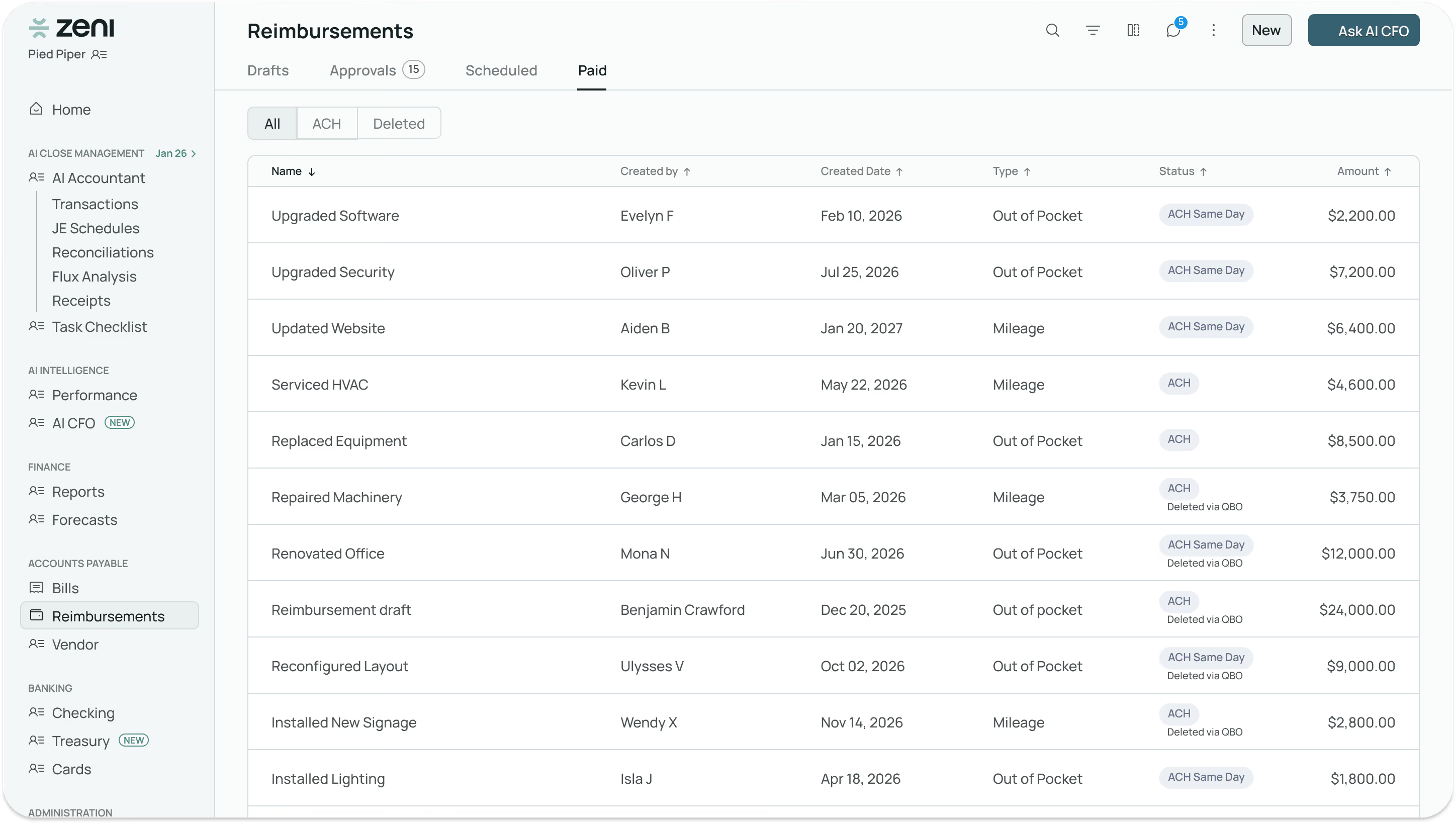
Zeni's AI Accounts Payable runs bills and employee reimbursements through the same four-stage process (Draft, Approval, Scheduled, Paid), while your AI Accountant codes every invoice and receipt automatically and your AI CFO answers any question about what's outstanding, in plain language.
Vendor tracking goes beyond a simple list: spend summaries, prepaid expense schedules, fixed assets, accrued expenses, and 1099 filing status all live in one place, so nothing about a vendor relationship requires a separate report.
Our favorite reasons to run AP with Zeni:
1. One process for bills and reimbursements
Vendor bills and employee reimbursements move through the exact same draft, approval, schedule, and paid stages, so you're not managing two separate systems.
2. Nothing gets typed in twice
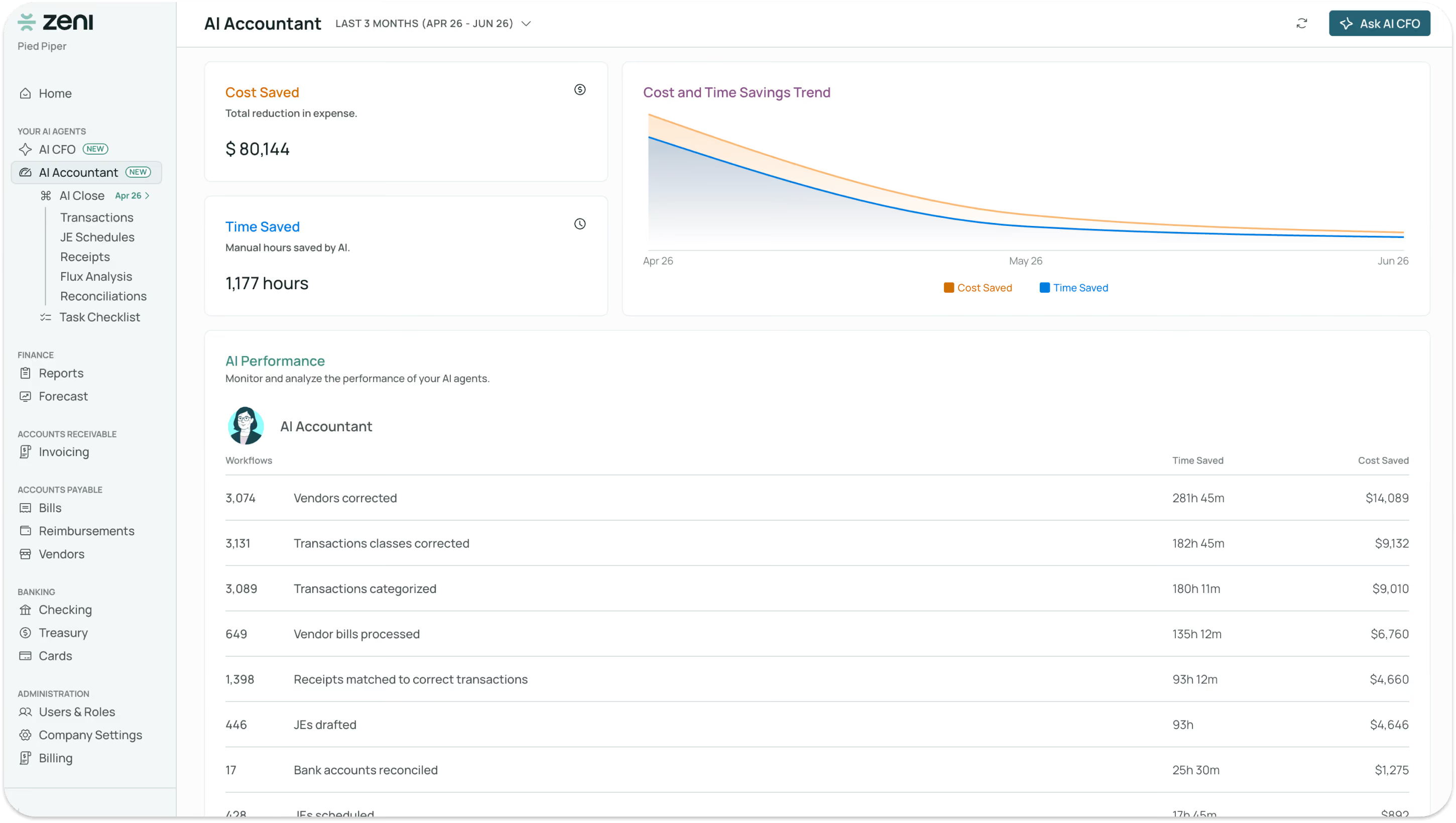
Your AI Accountant reads every bill and receipt and assigns the cost, category, class, and vendor automatically.
3. A real answer, not a report request
Ask your AI CFO a specific question about your AP and get a written answer with a chart back immediately.
4. Vendor visibility beyond the bill
Spend, prepaid schedules, fixed assets, accrued expenses, and 1099 status are tracked per vendor automatically, not assembled by hand each quarter.
5. Full status, always visible
Every bill and reimbursement shows exactly where it is, from Overdue to Awaiting Approval to Paid, so nothing quietly slips.
AI Accounts Payable: Deep Dive
Here's exactly how each part of Zeni's AI Accounts Payable works.

1. Bills
Every bill moves through four stages: Drafts, Approvals, Scheduled, and Paid. Upload an invoice and Zeni auto-fills the vendor, invoice number, invoice date, and due date, adjusting dates automatically if a bill is from a closed period. Approvers see previous invoices from the same vendor for context before approving, and payments post as ACH, wire, or offline, with statuses like Processing, Failed, and Canceled visible the whole way through.

2. Reimbursements
Employee reimbursements follow the same draft, approval, schedule, and paid lifecycle as vendor bills. An employee uploads a receipt, Zeni scans it and auto-fills the merchant, transaction date, and amount, and the request is categorized to the right expense category and department before it moves to approval.
3. Vendors
The Vendors tab covers six areas: a Summary of every vendor with year-to-date spend, an OPEX By Vendor view comparing spend month over month, Prepaid Expenses tracked as New, Ongoing, or Completed schedules, Fixed Assets with accumulated depreciation, Accrued Expenses awaiting recognition, and 1099 Filing status showing which vendors have a completed W-9 on file and which don’t.

4. AI Accountant
Your AI Accountant ingests every bill as it arrives and automates the cost, category, class, and vendor assignment, the same coding work a bookkeeper would otherwise do by hand for each invoice.
5. AI CFO
Ask your AI CFO any question about your accounts payable, like which vendors are overdue, what a specific vendor was paid last quarter, or which vendors are missing a 1099 filing, and get a real-time answer with a visual, not a report you have to assemble yourself.

Get started with AI accounts payable
Bills, reimbursements, and vendor tracking shouldn’t live in three different tools. Zeni's AI Accounts Payable keeps all three in sync automatically, with an AI Accountant coding every transaction and an AI CFO ready to answer anything you need to know.
Ready to see it on your own books? Book a demo and we’ll walk you through your live AP.