.avif)

Ready to invest in AI?
Schedule time with Zeni's finance pros to learn more.
Thank you! Your submission has been received!
Oops! Something went wrong while submitting the form.
According to the QuickBooks Business Solutions Survey, companies spend an average of 25 hours per week on manual data entry and reconciliation. This can create a significant drag on growth, with 91% of respondents saying it undermines productivity.
Automated reporting tools can significantly reduce your need for manual work. This guide explores what they are, their key features and benefits, and the most common types. We’ll also discuss how to choose and implement a specific solution.
Automated reporting tools are software solutions designed to streamline the most time-consuming aspects of various reporting processes. That primarily includes the collection, manipulation, and presentation of information.
These tools often work by integrating directly with each relevant data source. For example, automated financial reporting tools may connect with bank account and credit card feeds to collect transaction details without the need for human intervention.
Many automated reporting tools then use technologies like robotic process automation (RPA) or artificial intelligence (AI) to process that raw data. For instance, Zeni’s AI bookkeeping automatically categorizes transactions and combines redundant vendors.
Lastly, automated reporting tools organize complex data into readily digestible reports and visual dashboards. In the context of financial reporting, this often includes financial statements and chart trackers of key performance indicators (KPIs).
In most cases, the purpose of adopting an automated reporting tool is to reduce the need for manual work. This can have a wide range of benefits, including time and cost savings, fewer data entry errors, and earlier access to actionable insights.
Automated reporting tools vary in function depending on the type, but you can generally expect them to have a streamlined method of data collection. They need some way of efficiently gathering the raw information that the rest of their features revolve around.
This often involves direct connections with existing systems, such as through application programming interfaces (APIs). These allow for seamless, real-time data integration across your organization’s tech stack.
That said, some automated reporting tools have additional ways of rapidly collecting information. For example, Zeni also uses optical character recognition (OCR) to scan and extract key details from documents like invoices and receipts.

In addition to gathering information from various sources, automated reporting tools can organize everything into one authoritative location. This helps create a single source of truth, ensuring users across your organization have access to the same accurate data.
Many automated reporting tools can scan vast data sets to identify anomalies and outliers. This can be valuable in many use cases, helping you find warning signs and notable deviations from established trends.
Automated tools often use machine learning (ML) to support this data analysis. It studies your activities over time, establishing a baseline. Whenever a data point falls outside normal parameters, the system can then flag it for review.

For example, in financial reporting, this can help you catch fraudulent or non-compliant activities, such as expense reimbursement requests that violate company policy. Alternatively, it might reveal a sudden drop in cash inflows that could result in a shortfall.
However it manifests, automatic anomaly detection can help you address potential issues proactively. Instead of doing damage control weeks or months after the fact, you can implement solutions at the first sign of trouble.
As you might expect, automated reporting tools typically have robust features for transforming raw data into digestible outputs. These take different forms, but there should be some way to quickly generate structured summaries for stakeholders.
Traditionally, this has primarily included formal reports and standardized documents. For example, bookkeeping platforms have long been able to automate accounting processes like general ledger and financial statement preparation.
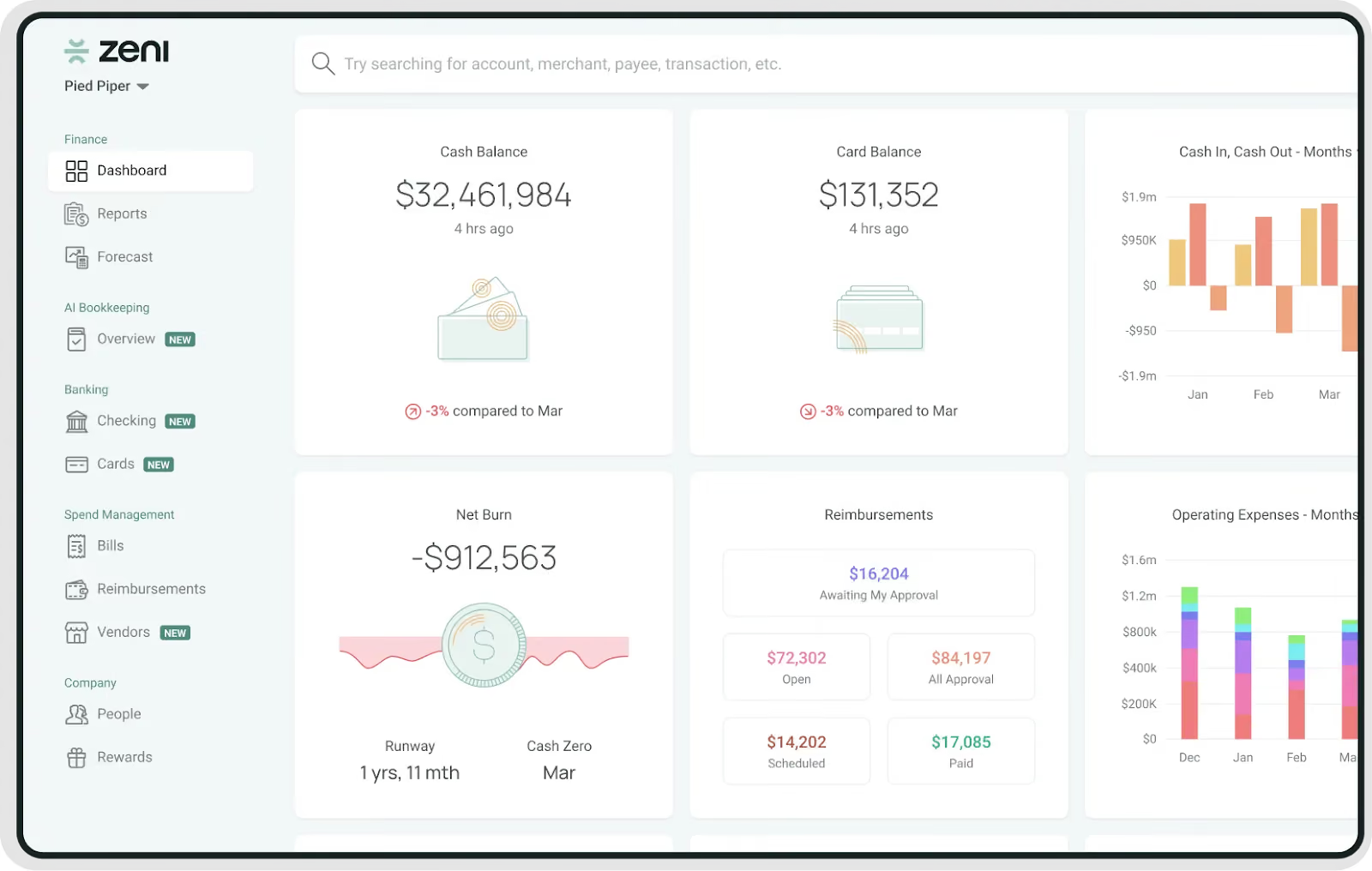
However, modern automated reporting software increasingly provides visual overviews that can be easier to understand at a glance. For example, Zeni’s interactive dashboard offers real-time financial data visualization of your company’s most important KPIs.
In combination with streamlined data collection, this helps ensure that you have timely access to key information. As a result, it can support faster and better-informed strategic decisions, driving long-term operational efficiency.
The main benefit of automated reporting tools is a decreased need for manual work. By automating routine processes like data entry and reconciliation, you can significantly reduce the number of hours your team spends on tedious tasks.
In addition to saving time upfront, this minimizes the risk of human errors, which are common with analytics in Excel or Google Sheets. As a result, your team no longer has to spend as many hours chasing down typos and other simple mistakes.
In combination, these efficiency gains can drive substantial cost savings, allowing you to operate at the same level with a lower employee headcount. Because of this, startups and other growing businesses often use automation to help them scale.
By reducing the need for manual administrative work, you also free your team to leverage their skills in higher-value areas. Not only does this help them contribute more toward your goals, but it can also support employee satisfaction and retention.
Another major benefit of automated report tools is that they can significantly improve compliance outcomes. This often includes meeting external regulatory requirements and internal policies or governance standards.
By reducing manual work, these tools prevent most of the human errors that often lead to non-compliance. They excel at managing repetitive, rule-based tasks, rarely making mistakes when manipulating well-structured data.
Automated systems are also highly efficient at recognizing anomalies and potential threats. In addition to doing it much faster than a typical employee, they’re often able to recognize patterns that the human eye might miss.
As a result, these tools can help you minimize costly penalties and stressful audits. Even when an audit does become necessary, you’ll have a reliable trail of documentation thanks to their automated record-keeping abilities.
One of the most important long-term benefits of automated reporting systems is the potential for improved decision-making. These tools provide timely access to the insights necessary for an informed, proactive strategy.
In addition to real-time data visibility and a report automation tool, this often includes visual breakdowns of important metrics. A dashboard with charts and graphs can highlight KPIs and trends, helping you assess your current status at a glance.
Beyond speed, automated data reporting solutions can also reveal patterns that you might not otherwise detect. Tools that leverage AI and ML often surface insights from vast datasets that aren’t apparent to the human eye.
Some business intelligence (BI) tools even have forecasting capabilities. By simulating potential outcomes, they can help you predict the impact of specific strategic adjustments before committing your resources.
Automated reporting solutions come in many different variations. Typically, the easiest way to categorize them is by the fundamental business function that they’re designed to streamline. For example, here are some of the main types of automated reporting tools:
With so many types of automated reporting tools to choose from, it can be tough to pick one to prioritize. After all, expanding your tech stack is often a significant commitment, especially when your runway is limited.
The easiest way to narrow down your options is often to work backward. Instead of shopping through solutions, start by analyzing your business’s current workflows and identifying the most valuable potential use cases.
In other words, look for areas that are most likely to benefit from automation. This typically includes operational bottlenecks and inefficient workflows, especially those that consistently require manual work or are prone to error.
As a new or small business, financial reporting automation is a popular place to begin. Good bookkeeping is essential for every company, playing a fundamental role in everything from tax compliance to strategic planning.
When you shift your focus to scaling more aggressively, automated sales and marketing reporting become more appealing. These can be invaluable for increasing revenue and driving sustainable growth.
By the time your company is a mature enterprise, an ERP system is likely to be the most valuable addition. It can break down data silos across your organization, helping disparate teams coordinate more effectively.
If you already know what type of automated reporting solution you’re looking for, there may still be countless options to choose from. Here’s a step-by-step framework to help you find the right solution for your business:
Zeni is a comprehensive solution for those looking to streamline the financial reporting process. Our platform takes full advantage of AI for accounting, automating everything from expense tracking and reconciliation to journal entries and receipt matching.
Even with the right solution, software implementation can be tricky to navigate. For example, Gartner research indicates that more than 70% of ERP initiatives fail to fully meet their original goals, with as many as 25% failing catastrophically.
As a result, it's important to treat implementation as a separate challenge. One of the most significant risks to manage is that of employee resistance.
Workers who feel threatened by or are uncomfortable with new solutions may simply refuse to adopt them.
The best way to prevent this is to invest in change management. Consult the software’s end-users during the selection process to align your choice with their pain points, and offer ongoing training and support to help ease the transition.
The other major implementation risk is that your project will take longer or cost more than you initially expected. Often, the best way to manage this is to tailor your rollout approach to your company’s unique needs.
For example, a "big bang" involves an immediate transition across your company, potentially minimizing timelines and costs. Meanwhile, a phased approach is more gradual, extending timelines but reducing the risk of catastrophic disruption.
If you’re not sure how best to proceed, consider hiring an expert consultant. This may increase upfront costs, but their in-depth software and implementation experience can save you time and capital overall.
![Venture capital trends and statistics in 2026 [new data]](https://cdn.prod.website-files.com/642b3b2440806566d7573934/6a7a31b1282ad91171af9142_venture-capital-trends-and-statistics_%402x.webp)




.avif)